Posts

Microsoft and Child accounts......again

So Microsoft still make this child account thing more difficult than it should be. Today I decided to try and set up child number three with his own MS account. I added him to family and this sent him an email with the contents: a@b.c would like you to join their family as a child.....Accept Invitation Clicking on the link resulted in a link to login to MS or create a new account. Clicking create new account resulted in a URL not found error. I then decided to just try and create his account via the normal MS create new account process (login.live.com). However I could get as far as creating his account and verifying his email address but this was invariably followed by: There's a temporary problem with the service.  Googling showed that I'm not the first person to see this so it obviously isn't temporary -  cannot-verify-microsoft-account-theres-a-temporary  from 2017. My guess is that once you've invited a child via a link then trying to create the accout via ...
Laptop hard drive upgrade - moving to SSD

Image
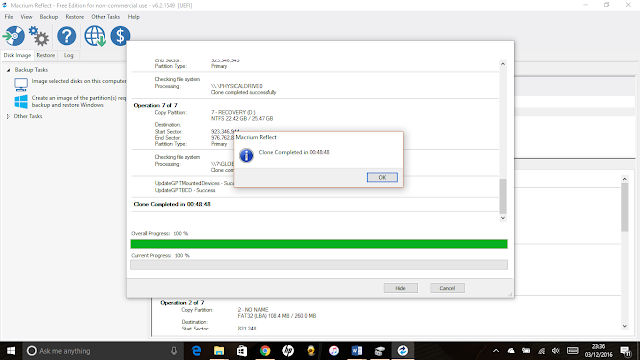
My daughter's 'not that old' HP Pavilion laptop has been running like a dog since upgrading to Windows 10. Windows 10 seems to rely heavily on disk I/O and the machine was permanently at 100% disk in task manager. Replacing the 500GB HDD with an SSD was going to cost <£100 so I thought I'd give it a go. Certainly cheaper than buying a new laptop. I ordered an MX300 from Crucial that also comes with a software licence for Acronis True Image. I also ordered a USB 3.0 to 2.5 Inch SATA hard drive adapter to allow me to clone the disk first. I wasn't about to reinstall Windows or go through some involved restore process. When everything had a arrived I set about cloning the hard disk using Acronis True Image software that Crucial provided a link/key to. Perhaps I misunderstood the documentation, but I couldn't get cloning to work. Acronis's software requires you to reboot in order to kick off the clone process but every time I rebooted it just came back u...

HP printers, iMacs and WiFi

Image
Do you have problems printing to an HP printer over WiFi from your OSX / Mac device? I've seen this a couple of times now: at home and also at my parents' house. Different machines, different printers but very similar symptoms (a year or so apart). In both cases the symptoms were slow/unusable printing as soon as documents were more than plain text and in some cases the print failing altogether. The problem seems to stem from the default airprint driver that your OSX device will helpfully install for you. You need to change this to the device specific driver as per the below instructions: Click the Apple icon on your Menu Bar.  Select System Preferences.  Select Printers and Scanners.  Select your printer and then press the (-) button at the bottom of the list to remove it.  Select the (+) and click Add Printers and Scanners. (NOTE: Do not select the printer from the list of Nearby printers as this will often automatically use the AirPrint driver)  Selec...

Sonos soundbar - buyer beware

I love Sonos products, but if you want to get the full surround sound experience out of the Playbar, SUB and two Play:1 speakers you could be in for a frustrating experience. The reason being that the Playbar and associated speakers are driven by a single optical input which in most cases has to be connected to your TV's optical output. This works fine for the TV and it's built in apps but in many cases the TV will not pass through proper surround sound if you've selected an external HDMI input such as an XBox or a DVD player. Added to this if the device in question is outputting DTS audio then even if you could get this to the Playbar it would refuse to play it (See  this Sonos forum discussion  for an example). Sonos have summarised the situation in  Maximizing PLAYBAR Sound from your Television If your TV doesn't pass through surround sound then a commonly suggested solution is to add in a TOSLINK audio switch. In most cases these have to be switched (via a re...

Microsoft accounts for children - Verify that you're an adult error

I recently bought a Windows 8 laptop for my son for his school work. However, after logging in with his email address (also used on an Xbox) he was unable to use any online features which are pretty key to Windows 8 and Office 365. As it was a child account he got prompted that he "needed permission to use this service” and to have an adult sign in. However, when I signed in as an adult to authorise this I was redirected to the following broken page: https://account.live.com/ChildConsent/PaymentCollection Verify that you're an adult Error When you verify your age with a credit card, Microsoft charges the card a one-time fee of $0.50 (50 cents), and a portion of the fee is donated to charity. Our system is temporarily unavailable. Please try again later. If the problem persists, please contact customer support. (40101-[2]-04c6207c-5883-4e91-b47d-2e6febec6efc) I contacted Microsoft support via email and got the following reply (24 hours later) Upon investigating both a...

Using Python to Automate Visio

There are lots of examples of automating office apps out there but Visio examples seem thin on the ground. I guess this is partly due to its relatively recent inclusion into the Office fold. The example below shows Visio code to create a diagram with two rectangles joined by a connector. Its written in Python and makes use of the win32com package provided by pywin32 . This is installed by default with ActivePython . I had some difficulty getting the makepy tool to see the Microsoft Visio 11.0 Type Library that showed up fine as a registered object in Visual Studio and Excel/VBA. In the end I had to explicitly point makepy at the VISLIB.DLL. That said the code below will work fine without this step as I don't make use of any of the Visio Constants. import os import win32com.client # Two lines below generated from the command: # python makepy.py -i VISLIB.DLL from win32com.client import gencache gencache.EnsureModule( '{00021A98-0000-0000-C000-000000000046}' , 0, ...

Tax return software

I've decided to bite the bullet and buy some software to fill my tax return in this year. My attempts to fill my tax return in online have always been thwarted by the fact that the Inland Revenue doesn't support any of the non standard forms. HMRC helpfully publish a list of supported software . Of course being the government they can't favour any one vendor so the list doesn't have any ratings of the individual software packages. Although the list is meant for individual tax returns the software isn't necessarily aimed at individual users - much of its seems to be aimed at tax agents. I whittled the list down based on the following requirements: I could fine the software on the website! There was a price The software looked like it was aimed at individuals/households I could get a feel for it with some kind of online demo This left me with the following list: TaxCalc 2007 (£24.99) Andica Self Assessment Personal (from £12.95) FTax (£14.95) Of these FTax looks to...